Platform:Win95,Win98,WinME,WinNT 4.x,WinXP,Windows2000,Windows2003,Windows Vista Starter,Windows Vista Home Basic,Windows Vista Home Premium,Windows Vista Business,Windows Vista Enterprise,Windows Vista Ultima
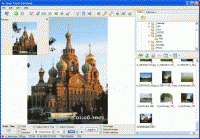
Create collections, datestamp automatically, lossless crop, rotate, resize, rename, view EXIF, view with snap stamping, "red eye" removal - all these and many other options for processing your digital photos are available with SnapTouch.
Experience a small revolution in the world of processing digital photos -- SnapTouch!
SnapTouch has features that are useful for any digital photo fan. With SnapTouch, any photographer, whether amateur or professional, can easily connect to an image source (a digital camera, a flash disk or other source), view and sort photos, specify where to copy them to and import them to a computer. SnapTouch can automatically rotate and/or rename photos while copying them. You can specify rules for renaming files. SnapTouch can also rename entire groups of photos. You can also rename digital photo files after they are copied.
SnapTouch has a convenient tool for removing the "red-eye" effect. Just select the area with the red-eye effect; SnapTouch will automatically detect it and make its color natural.
SnapTouch works with metadata (EXIF) from your digital photos and can display it. SnapTouch uses this information for renaming files, writing comments, and date stamping photos. Before printing a photo, you can stamp it with the unique date and time it was taken. You can easily specify the location and style of this information.
With SnapTouch you can semi-automatically lossless crop groups of files while maintaining their proportions. Never before has is been so easy to change your photos' proportions.
SnapTouch has many other features common to this type of software: previewing changes, adjusting brightness, contrast and spectrum, resizing photos, adding comments, mirroring, viewing photos in full-screen mode and much more. Many effects are applied without additional compression and without reducing the quality of your photos. Whats new in version 2.90: + now it is possible to rotate the selection frame in the crop mode. Requirements: Windows system Operating system: Win95,Win98,WinME,WinNT 4.x,WinXP,Windows2000,Windows2003,Windows Vista Starter,Windows Vista Home Basic,Windows Vista Home Premium,Windows Vista Business,Windows Vista Enterprise,Windows Vista Ultima Limitations: - displays a nag-screen on each startup; -watermark on processed photos Release notes: New Release
MagicBD is a graphic software which can be used to draw many kinds of iconographies, illustrations and sketch maps.It can also be used to edit images to process them or get some special effects.
Price: $28, Rating: 10, Downloads: 234 Download
Pos Free Photo Editor is a free photo editor from the authors of the best free professional photo editor - Photo Pos Pro free photo editor. The software is simple and very user friendly photo editor, that lets you easily view, and enhance your photos
Price: $0.00, Rating: 10, Downloads: 190 Download
Design over 10 photos by few mouse clicks. Easily create photo book, collage, calendar, greeting cards, wedding photos and more artworks.
Price: $39.95, Rating: 0, Downloads: 171 Download
Image Frame is a Photoshop-compatible plug-in for easy creation naturally-look 3D frame. Add frame and text to your photos. You can apply rectangular and elliptical frame, change frame profile, material, and lightening.
Price: $14.95, Rating: 10, Downloads: 160 Download
User Rating
Rating:2.2 out of
5 Based on13 ratings.
13 user reviews.

 SnapTouch 2.90 details